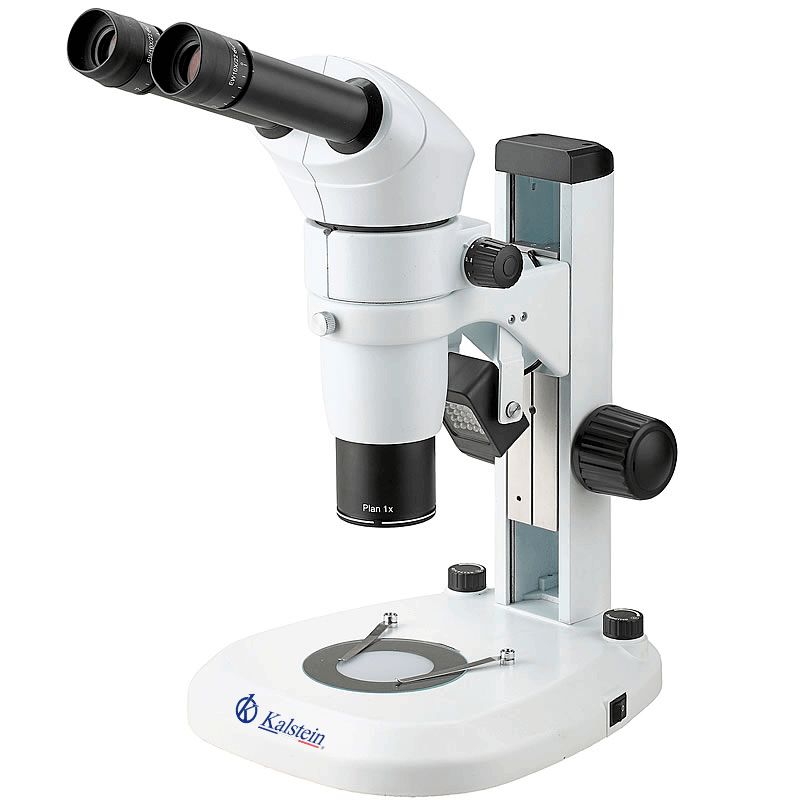
Troubleshooting Common Errors with the YR0246 Microscope: A Comprehensive Guide
The YR0246 Trinocular Microscope is renowned for its exceptional optical performance and ergonomic design. While it offers outstanding capabilities for various applications in scientific and clinical environments, users may encounter common operational errors. This article aims to identify these issues, provide probable causes, and present actionable solutions for efficient troubleshooting.
Understanding the YR0246 Microscope
The YR0246 microscope utilizes a parallel infinity optical system that provides unparalleled optical performance. It features LED illumination with a lifespan of up to 6000 hours, ensuring consistent brightness and minimal maintenance. With a comprehensive range of accessories, the YR0246 is suitable for research in biological, medical, and industrial fields.
Technical Specifications of the YR0246
| Model | YR0246 |
|---|---|
| Optical System | Parallel Infinity Optical System, modular design |
| Head | Binocular head, inclined at 20° |
| Zoom Ratio | Up to 1:10 |
| Illumination | LED transmission and reflection, adjustable brightness |
| Working Distance | 78 mm |
| Focus | Coarse and fine focus knob, range of 105 mm |
| Weight | 10 kg |
| Dimensions | 37 x 32 x 67 cm |
Troubleshooting by Symptoms
When operating the YR0246 microscope, users may experience various errors. Below are some common symptoms, their probable causes, and effective solutions.
Equipment Does Not Power On
If the YR0246 microscope fails to power on, consider the following potential causes:
- Power supply issues
- Faulty power cord or connection
- Internal circuitry failure
To troubleshoot this issue, follow these steps:
- Check the power outlet for functionality by testing another device.
- Inspect the power cord for any visible damage or loose connections.
- Open the microscope housing to check for any blown fuses or damaged components.
Inconsistent Readings
Inconsistent readings may arise from multiple factors, including:
- Improper calibration
- Dirty optics or slides
- Environmental conditions affecting measurements
To resolve this issue, ensure that:
- The microscope is calibrated according to the manufacturer's guidelines.
- All optics are clean, and slides are free of debris.
- The working environment meets the necessary temperature and humidity levels.
Error Code E-03 Displayed
Error code E-03 may indicate a problem with the LED illumination system. Possible causes include:
- LED module failure
- Power delivery issues
To address this error code, follow these steps:
- Inspect the LED module for signs of failure or burnout.
- Check power connections to ensure consistent delivery to the LED unit.
Symptom-Cause-Solution Table
| Symptom | Possible Cause | Solution |
|---|---|---|
| Equipment does not power on | Power supply failure | Check outlet, cord, and internal components |
| Inconsistent readings | Dirty optics | Clean optics and slides |
| Error code E-03 | LED failure | Inspect and replace the LED module |
Common Maintenance Practices
Routine maintenance is crucial for the optimal performance of the YR0246 microscope. Below are recommended practices to ensure longevity and reliability:
- Regularly clean lenses and optical components with appropriate materials to avoid scratches.
- Inspect and replace the LED illumination system as necessary to maintain consistent lighting.
- Conduct periodic calibrations according to the manufacturer's guidelines.
- Keep the microscope covered when not in use to protect it from dust and environmental contaminants.
Frequently Asked Questions
What should I do if my YR0246 microscope shows a blank screen?
A blank screen may indicate a power issue, a faulty connection, or a malfunctioning display. Check power supply and connections first, then consult the manual for display troubleshooting.
How do I clean the optics of the YR0246 microscope?
Use a soft, lint-free cloth and a suitable lens cleaner to gently wipe the optics. Avoid abrasive materials that may scratch the lenses.
Is it possible to replace the LED light source in the YR0246?
Yes, the LED light source can be replaced. Refer to the service manual for instructions on how to safely remove and install a new LED module.
How often should I calibrate the YR0246 microscope?
Calibration should be performed at regular intervals or whenever the microscope is moved to a new location to ensure accurate measurements.
Can I use the YR0246 microscope in a humid environment?
While the YR0246 is designed for varied environments, excessive humidity can affect performance. Ensure the working area is kept within recommended humidity levels.
What accessories are compatible with the YR0246 microscope?
The YR0246 is compatible with various accessories such as polarizers, dark field adapters, and fluorescent lights. Check the specifications for a full list of compatible accessories.
Conclusion
Operating a YR0246 microscope can be highly efficient if common errors are identified and solved promptly. By following the troubleshooting guidelines and maintaining good practices, users can ensure that their microscope delivers reliable and accurate results over its lifespan.
If you are looking for a fusion of innovation and quality, you have come to the right place. At Kalstein, we offer you the luxury of exploring our exclusive catalog of laboratory equipment. We manufacture every device to the highest standards of excellence. Our intuitive and seamless online purchasing channels are designed for your convenience, securing the most competitive prices. Hesitate no longer — we bring science to life, it is time to become part of our community.