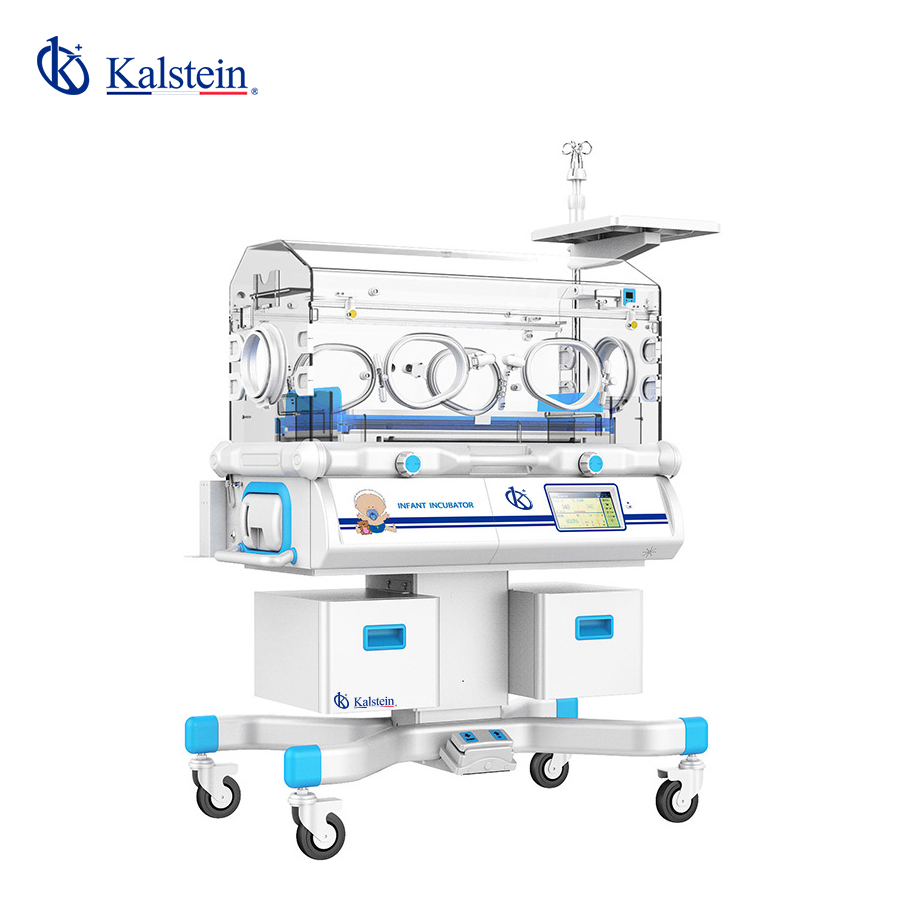
Troubleshooting Common Issues with the YR06214 Infant Incubator
The YR06214 Infant Incubator is a highly specialized piece of equipment designed to provide a controlled environment for newborns. However, like any sophisticated device, it can encounter issues that require troubleshooting. This guide addresses common symptoms, probable causes, and solutions to ensure the incubator operates efficiently.
Technical Specifications of the YR06214
| Specification | Details |
|---|---|
| Model | YR06214 |
| Electrical Requirement | ~220V 50Hz |
| Heater Power | 550VA |
| Air Mode Temperature Range | 25.0°C - 37.0°C |
| Skin Mode Temperature Range | 34.0°C - 37.0°C |
| Air Mode Temperature Alarm | < 38.0°C |
| Skin Mode Temperature Alarm | < 40.0°C (Air temperature) |
| Humidity Control Range | 30-90% RH |
Common Symptoms and Troubleshooting Strategies
When using the YR06214 Infant Incubator, users may encounter several issues. Below are common symptoms categorized by their nature, along with probable causes and solutions.
Equipment Does Not Power On
If the YR06214 does not power on, consider these potential causes:
- Power Source Issue: Ensure the power outlet is functional and the power cord is securely connected.
- Internal Fuse Blow: Check the internal fuse; if it's blown, it will need replacement.
- Faulty Control Panel: Inspect the control panel for signs of damage or malfunction.
To resolve this issue, verify the power source, replace the internal fuse if necessary, and consult a technician for control panel issues.
Error Code E-03
Error code E-03 may indicate a temperature sensor malfunction. Possible causes include:
- Disconnected Sensor: Check if the temperature sensor is connected properly.
- Faulty Sensor: The sensor may need calibration or replacement if it is defective.
To troubleshoot, reconnect the sensor and test its functionality. If the error persists, replacement may be necessary.
Inconsistent Temperature Readings
Inconsistent temperature readings can occur due to:
- Calibration Issues: The incubator may need recalibration.
- Environmental Interference: Ensure the incubator is not placed in a location with drafts or extreme temperature fluctuations.
To fix this issue, recalibrate the incubator and relocate it if necessary to stabilize conditions.
Humidity Levels Not Stabilizing
If humidity levels fluctuate or do not stabilize, consider the following:
- Water Reservoir Empty: Check the water reservoir; refill if necessary.
- Humidity Sensor Malfunction: Inspect the humidity sensor for defects.
Ensure the reservoir is filled with water and replace the humidity sensor if it appears damaged.
Frequent Alarm Triggers
Frequent alarms may indicate:
- Temperature Fluctuations: Investigate possible drafts or placement issues.
- Faulty Alarm System: Test the alarm system functionality.
To resolve frequent alarms, adjust the placement of the incubator and consider consulting a technician for alarm system checks.
Symptom-Cause-Solution Table
| Symptom | Probable Cause | Solution |
|---|---|---|
| Equipment does not power on | Power source issue, internal fuse blow, faulty control panel | Check power outlet and cord, replace fuse, consult technician |
| Error Code E-03 | Disconnected sensor, faulty sensor | Reconnect sensor, replace sensor if defective |
| Inconsistent temperature readings | Calibration issues, environmental interference | Recalibrate incubator, relocate to stable environment |
| Humidity levels not stabilizing | Water reservoir empty, humidity sensor malfunction | Refill reservoir, replace humidity sensor |
| Frequent alarm triggers | Temperature fluctuations, faulty alarm system | Adjust incubator placement, check alarm functionality |
Frequently Asked Questions
What should I do if the incubator alarms frequently?
If the incubator triggers alarms frequently, check for environmental factors such as drafts or extreme temperatures that may affect readings. Additionally, inspect the alarm system for faults.
How can I ensure accurate temperature readings in the YR06214?
To ensure accurate temperature readings, place the incubator in a stable environment, free from drafts, and regularly calibrate the temperature sensors according to the manufacturer's guidelines.
What maintenance is required for the YR06214 Infant Incubator?
Regular maintenance includes checking and refilling the water reservoir, calibrating sensors, and inspecting electrical connections for wear and tear.
How can I troubleshoot humidity control issues?
To troubleshoot humidity control issues, ensure the water reservoir is filled and check the humidity sensor for malfunctions. If necessary, replace the sensor to restore functionality.
What steps should I take if I see error code E-03?
Error code E-03 indicates a temperature sensor issue. Check the sensor connections and replace the sensor if it appears to be defective.
How do I recalibrate the YR06214 Incubator?
To recalibrate the YR06214 Incubator, follow the manufacturer's instructions, ensuring to adjust the temperature and humidity settings according to specific guidelines provided in the user manual.
Can I request a quote for the YR06214 Incubator?
Yes, you can request a quote for the YR06214 Incubator through our designated sales channels.
If you are looking for a fusion of innovation and quality, you have come to the right place. At Kalstein, we offer you the luxury of exploring our exclusive catalog of laboratory equipment. We manufacture every device to the highest standards of excellence. Our intuitive and seamless online purchasing channels are designed for your convenience, securing the most competitive prices. Hesitate no longer — we bring science to life, it is time to become part of our community.