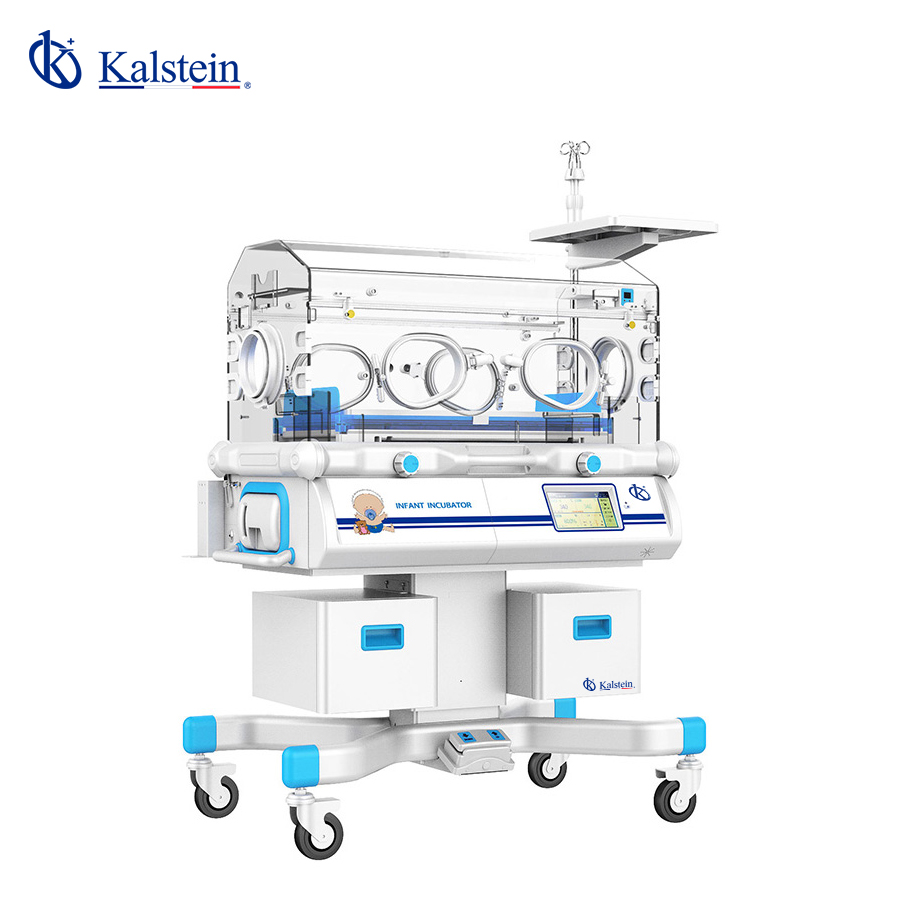
Troubleshooting Common Errors in the YR06213 Infant Incubator
The YR06213 Infant Incubator is a sophisticated medical device designed to maintain optimal thermal conditions for newborns. With advanced features such as servo-controlled temperature for air and skin, various alarm systems, and an LCD touchscreen control panel, ensuring reliable operation is paramount. This article will delve into frequent errors and their solutions, guiding operators in troubleshooting effectively.
Understanding the YR06213 Infant Incubator
The YR06213 Infant Incubator is built to provide a controlled environment for infants, ensuring they receive the necessary warmth and humidity. Its features include:
- 7-inch LCD touchscreen control panel
- Computer-controlled air and skin temperature
- Multiple alarms and self-check systems
- Adjustable mattress tilt
- Removable humidity tray for easy cleaning
- Additional features like phototherapy and weighing functions
Technical Specifications of the YR06213
| Specification | Details |
|---|---|
| Model | YR06213 |
| Electrical Requirements | ~220V 50Hz |
| Heater Power | 550VA |
| Air Mode Temperature Range | 25.0°C-37.0°C |
| Skin Mode Temperature Range | 34.0°C-37.0°C |
| Air Mode Temperature Alarm | 38.0°C |
| High Temperature Mode Alarm | < 40.0°C (Air Temperature) |
| Humidity Control Range | 30-90% RH |
| Humidity Display Range | 0-99.9% RH |
Common Symptoms and Troubleshooting Steps
In operating the YR06213, users may encounter various symptoms indicating malfunction or error. This section outlines common issues, their probable causes, and suggested solutions.
Equipment Does Not Power On
When the incubator fails to power on, consider the following possible causes:
- Power supply issues
- Faulty power cord
- Internal fuse failure
To troubleshoot:
- Check if the power outlet is functional.
- Inspect the power cord for visible damage.
- Examine internal fuses and replace if necessary.
Error Code E-03
Error code E-03 typically indicates a temperature sensor malfunction. Possible causes include:
- Disconnected or damaged temperature sensor
- Calibration error
Steps to resolve:
- Inspect sensor connections for proper seating.
- Perform a recalibration of the temperature settings.
Inconsistent Temperature Readings
If the incubator displays inconsistent temperature readings, investigate the following:
- Improper placement of the temperature probe
- External temperature influences
To fix this issue:
- Ensure the temperature probe is positioned correctly within the incubator.
- Limit external drafts or heat sources near the incubator.
| Symptom | Probable Cause | Solution |
|---|---|---|
| Equipment Does Not Power On | Power supply issues, faulty power cord | Check power outlet, inspect power cord |
| Error Code E-03 | Temperature sensor malfunction | Inspect sensor connections, recalibrate |
| Inconsistent Temperature Readings | Improper probe placement, external influences | Correct probe placement, limit external factors |
Optional Accessories for the YR06213
Utilizing optional accessories can enhance the functionality of the YR06213. Some key accessories include:
- Weighing Functionality
- Electric Lift
- Additional Drawers
- Storage Cabinet
These accessories can provide added convenience and efficiency in the usage of the incubator.
Frequently Asked Questions
What should I do if the YR06213 incubator shows a high-temperature alarm?
First, check the settings and ensure the temperature is not set too high. If the alarm persists, verify the functioning of the temperature sensors and check for any obstructions affecting air circulation.
How can I clean the humidity tray in the YR06213?
The humidity tray is removable for easy cleaning. Make sure to disconnect the power supply before removing the tray. Clean with a mild detergent and rinse thoroughly before reinserting.
What are the benefits of using the YR06213 incubator?
The YR06213 incubator provides a controlled environment that supports thermal regulation and humidity management, crucial for the health of newborns. Its advanced alarms and touchscreen interface enhance usability and safety.
How often should I calibrate the YR06213 incubator?
Calibration should be performed regularly, typically once a month, or when you notice discrepancies in temperature readings. Regular calibration ensures the accuracy and reliability of the incubator.
Can the YR06213 incubator be used for phototherapy?
Yes, the YR06213 incubator can be equipped with optional phototherapy features, making it suitable for treating jaundiced infants by providing the necessary light treatment alongside temperature control.
What voltage is required for operating the YR06213 incubator?
The YR06213 requires approximately 220V at 50Hz for proper operation. Ensure the power supply meets these specifications to avoid damage.
How do I report persistent error codes in the YR06213?
For persistent error codes that cannot be resolved through basic troubleshooting, contact a qualified technician or the manufacturer for further assistance and potential service options.
If you are looking for a fusion of innovation and quality, you have come to the right place. At Kalstein, we offer you the luxury of exploring our exclusive catalog of laboratory equipment. We manufacture every device to the highest standards of excellence. Our intuitive and seamless online purchasing channels are designed for your convenience, securing the most competitive prices. Hesitate no longer — we bring science to life, it is time to become part of our community.