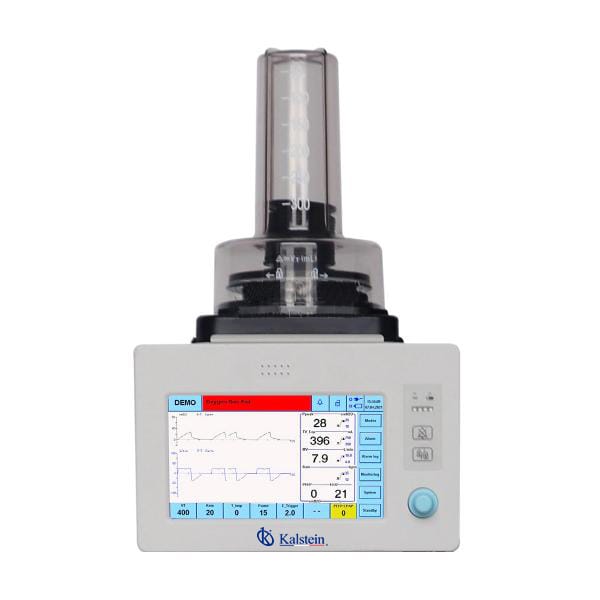
Troubleshooting Common Errors in the YR06103 Veterinary Anesthesia Ventilator
The YR06103 Veterinary Anesthesia Ventilator, designed for precise and reliable veterinary anesthesia delivery, can encounter several operational errors. Understanding these common issues and their remedies is critical for maintaining optimal performance. This guide provides a detailed approach to troubleshooting the YR06103, enabling operators to efficiently resolve symptoms and minimize downtime.
Technical Specifications of YR06103
| Feature | Specification |
|---|---|
| Model | YR06103 |
| Display | 9-inch TFT touch screen |
| Gas Type | O2 or Air |
| Inlet Pressure | 280-600 kPa |
| Max Flow | ≤ 120 L/min |
| Operating Mode | VCV, PCV, SPONT, Manual, Demo |
| Tidal Volume Range | 20 - 1500 ml |
| Respiratory Rate Range | 1 ~ 150 bpm |
| Battery Type | Li-ion, work time more than 2 hours |
Common Symptoms and Troubleshooting Steps
Operators may encounter various symptoms during the use of the YR06103. Below is a comprehensive list of common issues, their probable causes, and recommended solutions.
Equipment Does Not Power On
This issue may occur due to various factors. Possible causes include:
- Power supply issues: Ensure that the ventilator is properly plugged into a functioning outlet.
- Internal battery failure: Verify the battery charge level and inspect for any damage.
- Fuse failure: Check the internal fuse for continuity and replace if necessary.
To resolve this issue, follow these steps:
- Confirm the power outlet is operational.
- Inspect the power cable for kinks or breaks.
- Charge the device for at least 2 hours and try again.
Error Code E-03
This error typically indicates a sensor malfunction. To troubleshoot:
- Check sensor connections for any loose wires.
- Inspect for obstructions that may be affecting the sensor.
- Perform a system reset following the user manual instructions.
Inconsistent Readings
Inconsistent readings can arise from several issues, such as:
- Poor calibration: Ensure the device is calibrated according to the manufacturer’s guidelines.
- Environmental interference: Consider external factors such as humidity and temperature fluctuations.
- Equipment malfunction: If readings remain inconsistent, a deeper inspection may be necessary.
Follow these steps to correct inconsistent readings:
- Recalibrate the device.
- Check the equipment's environment for any potential interferences.
- If the problem persists, contact technical support for further assistance.
Symptom-Cause-Solution Matrix
| Symptom | Probable Cause | Solution |
|---|---|---|
| Equipment Does Not Power On | Power supply issues, battery failure | Check power source and battery condition |
| Error Code E-03 | Sensor malfunction | Inspect connections and reset system |
| Inconsistent Readings | Poor calibration, environmental interference | Recalibrate and inspect environment |
Maintenance Tips for YR06103
Regular maintenance is essential to prevent errors and ensure the longevity of the YR06103. Here are some key maintenance practices:
- Routine Calibration: Regularly calibrate the device to ensure accuracy.
- Battery Management: Monitor battery performance and replace it as needed.
- Cleaning: Keep all components clean, particularly sensors and air filters, to avoid interference with readings.
Frequently Asked Questions
How do I reset the YR06103 after an error?
To reset the YR06103, locate the reset button on the device. Refer to the user manual for specific instructions on performing the reset, which typically involves holding the button for a few seconds until the display indicates a successful reset.
What should I do if the battery does not hold a charge?
If the battery does not hold a charge, first check the battery connections for any corrosion or looseness. If connections are secure, the battery may need to be replaced. Contact the manufacturer for replacement options.
Can the YR06103 be used with different gas types?
Yes, the YR06103 can operate using either O2 or air. Ensure that you select the appropriate gas type on the device settings to ensure optimal performance.
What is the maximum tidal volume for the YR06103?
The maximum tidal volume for the YR06103 is 1500 ml. Ensure that the volume is set correctly according to the patient's needs to avoid respiratory complications.
How often should maintenance be performed on the YR06103?
Maintenance should be performed regularly, at least every six months, or whenever the device shows signs of malfunction. Frequent checks can prevent major issues and ensure reliability.
If you are looking for a fusion of innovation and quality, you have come to the right place. At Kalstein, we offer you the luxury of exploring our exclusive catalog of laboratory equipment. We manufacture every device to the highest standards of excellence. Our intuitive and seamless online purchasing channels are designed for your convenience, securing the most competitive prices. Hesitate no longer — we bring science to life, it is time to become part of our community.