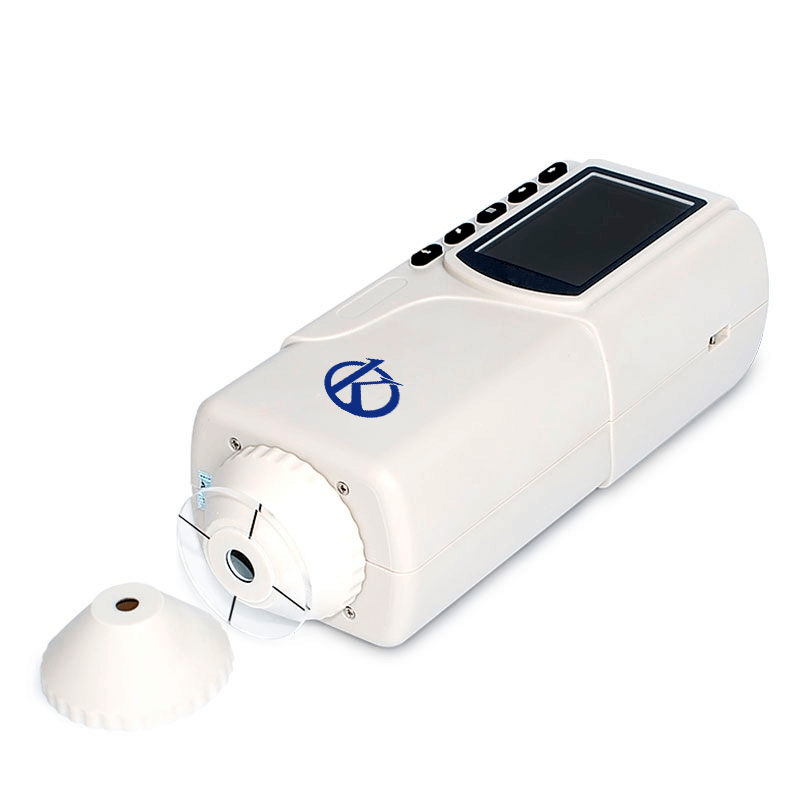
Troubleshooting Common Errors with the YR05513 Colorimeter: A Practical Guide
The YR05513 colorimeter is a highly precise instrument designed for a wide range of applications, from quality control in manufacturing to research in scientific laboratories. Despite its robust design and advanced features, users may encounter occasional errors during operation. This guide aims to provide practical troubleshooting steps for the most common issues associated with the YR05513, ensuring optimal performance and reliability.
Technical Specifications of YR05513
| Model | YR05513 |
|---|---|
| Illumination/Viewing Geometry | 8/d (8° illumination angle/diffuse viewing); Complies with CIE No.15, GB/T 3978. |
| Light Source | White LED |
| Detector | Silicon photoelectric diode |
| Measurement Aperture | Flat aperture Φ8 mm; Tip aperture Φ4 mm |
| Color Space | CIE LAB |
| Color Difference Formula | ΔE*ab |
| Observer Angle | CIE 10° |
| Light Source Standard | D65 |
| Display Data | Chromaticity values, color difference values/graph, PASS/FAIL result, color compensation |
| Measurement Time | 1.0s |
| Repeatability | Standard deviation within ΔE*ab 0.03 (Average of 30 standard white plate measurements) |
| Dimension | 205×67×80mm |
| Weight | 500g |
| Power Source | 3.7 V rechargeable lithium-ion battery, 3200 mAh |
| Operating Environment | 0~40 ℃ (32~104 °F) |
| Storage Environment | -20~50℃ (-4~122°F) |
| Standard Accessories | Power adapter, user guide, wrist straps, flat aperture Φ8 mm; tip aperture Φ4 mm. |
Common Symptoms and Troubleshooting Steps
When operating the YR05513 colorimeter, users may encounter various symptoms that may indicate underlying issues. Below is a detailed breakdown of common symptoms, their probable causes, and recommended solutions.
Equipment Does Not Power On
If the YR05513 colorimeter does not power on, it may be due to several factors:
- Probable Causes:
- Battery is depleted.
- Loose connections.
- Faulty power adapter.
- Diagnostic Steps:
- Check the battery charge level.
- Inspect power connections.
- Test the power adapter with another device.
- Solutions:
- Charge the battery fully.
- Reconnect all loose connections.
- Replace the power adapter if faulty.
Error Code E-03 Displayed
Error code E-03 may indicate a calibration error or a malfunction in the sensor component.
- Probable Causes:
- Improper calibration process.
- Contaminated sensor.
- Diagnostic Steps:
- Refer to the calibration manual to ensure correct procedures were followed.
- Inspect the sensor for contamination.
- Solutions:
- Recalibrate the device following the user manual.
- Clean the sensor following manufacturer guidelines.
Inconsistent Readings
Inconsistent readings from the YR05513 can lead to unreliable measurement results.
- Probable Causes:
- Sample preparation not uniform.
- Environmental conditions affecting measurements.
- Faulty internal components.
- Diagnostic Steps:
- Check the uniformity of the sample being tested.
- Evaluate the operating environment for temperature fluctuations.
- Run a self-diagnostic test if available.
- Solutions:
- Ensure samples are prepared uniformly before measurement.
- Maintain a stable room temperature and avoid drafts.
- Consult support for potential internal repairs.
Symptom-Cause-Solution Matrix
| Symptom | Probable Cause | Solution |
|---|---|---|
| Equipment does not power on | Battery is depleted | Charge the battery |
| Error code E-03 displayed | Improper calibration | Recalibrate according to manual |
| Inconsistent readings | Sample preparation not uniform | Ensure uniform sample preparation |
Frequently Asked Questions
What should I do if my YR05513 colorimeter displays inconsistent results?
If your YR05513 colorimeter displays inconsistent results, check the uniformity of your samples, review the environmental conditions, and evaluate the calibration of the device. Ensuring that the samples are prepared uniformly and that the device is calibrated correctly can help achieve consistent readings.
How can I properly calibrate my YR05513 colorimeter?
To properly calibrate the YR05513 colorimeter, follow the instructions outlined in the user manual. This typically involves using standard white plates and ensuring proper lighting conditions during the calibration process. Make sure to handle the equipment carefully and maintain a clean environment to avoid contamination.
What does error code E-03 indicate on the YR05513?
Error code E-03 indicates a calibration error or a potential malfunction within the sensor. It is recommended to recalibrate the device and inspect the sensor for any contamination. If the issue persists, contact technical support for further assistance.
Is it necessary to clean the sensor of the YR05513 colorimeter frequently?
Yes, maintaining a clean sensor is critical for accurate measurements. Regular cleaning, especially after testing samples that may leave residues, helps ensure that the sensor remains functional and reliable.
Where can I find replacement parts for the YR05513 colorimeter?
Replacement parts for the YR05513 colorimeter can typically be sourced through authorized distributors or directly from the manufacturer. It is essential to use original parts to ensure compatibility and maintain the integrity of the device.
Can I use the YR05513 colorimeter for different types of samples?
Yes, the YR05513 colorimeter is designed to accommodate a variety of samples, including those used in plastics, textiles, food, and pharmaceuticals. Its dual apertures facilitate ease of use across different types of materials.
If you are looking for a fusion of innovation and quality, you have come to the right place. At Kalstein, we offer you the luxury of exploring our exclusive catalog of laboratory equipment. We manufacture every device to the highest standards of excellence. Our intuitive and seamless online purchasing channels are designed for your convenience, securing the most competitive prices. Hesitate no longer — we bring science to life, it is time to become part of our community.