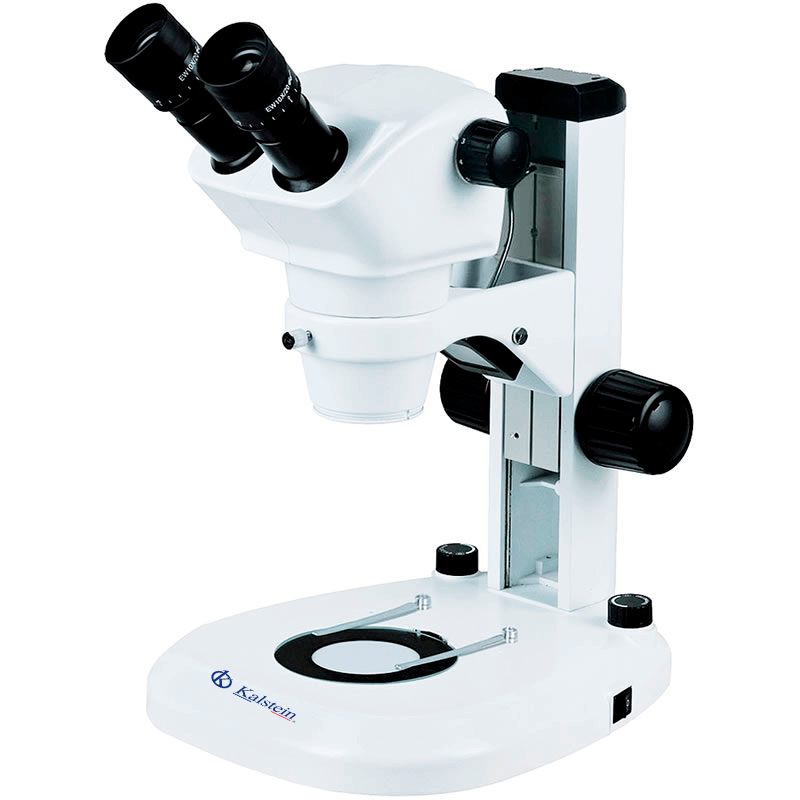
Troubleshooting Common Errors of the YR0254 Microscope: Symptoms and Solutions
The YR0254 Zoom Stereo Microscope is a versatile tool designed for a wide range of applications in clinical labs, dissection, and educational environments. Despite its robust design and high-quality optics, operators may encounter common issues that can affect performance. This article serves as a practical guide for troubleshooting the YR0254 by symptom, providing probable causes and solutions to restore functionality and ensure reliable operation.
Understanding the YR0254 Microscope
The YR0254 microscope is designed for low magnification observation of solid samples, utilizing two separate optical paths to create a three-dimensional image. Its ergonomic design and high-quality components ensure user comfort and clear imaging. Key specifications include a magnification range of 0.8x to 5x and a working distance of 115 mm, making it ideal for various applications.
Technical Specifications of YR0254
| Specification | Details |
|---|---|
| Model | YR0254 |
| Head | Trinocular, inclined 45°, interpupillary distance 55~75 mm |
| Eyepiece | Wide field EW10x/22 mm, adjustable diopter |
| Magnifying Objective | 0.8x~5x |
| Zoom Ratio | 01:06.3 |
| Working Distance | 115 mm |
| Illumination | LED light, adjustable brightness |
| Power | Wide voltage range 100 ~ 240 V |
Troubleshooting by Symptom
Equipment Does Not Power On
If the YR0254 microscope fails to power on, several potential causes may be at play:
- Power Supply Issue: Check if the microscope is correctly plugged into a functioning power outlet.
- Faulty Power Cable: Inspect the power cable for any visible damage or loose connections.
- Internal Fuse Blown: Consider checking or replacing the internal fuse if applicable.
To resolve this issue, ensure all connections are secure, replace any damaged components, and verify the outlet's functionality.
Inconsistent Readings
Inconsistent readings may stem from various factors:
- Misalignment of Optical Components: Confirm that the eyepiece and objective lenses are properly seated.
- Dirty Lenses: Clean the lenses with appropriate lens cleaning solutions to avoid obstructed views.
- Improper Calibration: Recalibrate the microscope according to manufacturer guidelines.
Address these potential issues to achieve consistent and accurate readings.
Image Distortion
Image distortion can be caused by:
- Incorrect Focus: Adjust the focus knobs to ensure a clear view.
- Optical Path Obstruction: Ensure there are no objects obstructing the optical path.
- Worn Optical Components: Inspect and replace any worn-out components.
Resolving these issues will help maintain the clarity and quality of images produced by the YR0254.
Symptom-Cause-Solution Matrix
| Symptom | Probable Cause | Solution |
|---|---|---|
| Equipment does not power on | Power supply issue | Check power connections and replace cables if necessary |
| Inconsistent readings | Misalignment of optical components | Realign and calibrate optical components |
| Image distortion | Dirty or worn lenses | Clean or replace optical components |
Frequently Asked Questions
What are the common symptoms of malfunction in the YR0254 microscope?
Common symptoms include equipment not powering on, inconsistent readings, and image distortion. Each symptom can be attributed to specific causes, and troubleshooting steps can help rectify these issues.
How do I clean the lenses of the YR0254 microscope?
Use a microfiber cloth and a lens cleaning solution specifically designed for optical equipment. Gently wipe the lenses to avoid scratches while ensuring all debris is removed.
What should I do if the LED illumination is not functioning?
First, check the power supply and connections. If the issue persists, inspect the LED for damage and consider replacing it if necessary.
How can I ensure accurate magnification settings on the YR0254?
Calibration is key to achieving accurate magnification. Follow the manufacturer's instructions for calibration and regular maintenance checks to ensure optimal performance.
Are there specific accessories recommended for the YR0254 microscope?
Yes, optional accessories such as additional eyepieces, auxiliary lenses, and camera adapters can enhance the functionality of the YR0254 for specific applications.
What is the warranty period for the YR0254 microscope?
The YR0254 microscope typically comes with a warranty period of one year, covering manufacturing defects and component failures under normal use.
How often should I perform maintenance on the YR0254 microscope?
Regular maintenance checks every six months are recommended to ensure all components are functioning correctly, and to clean the optical paths and calibration settings.
If you are looking for a fusion of innovation and quality, you have come to the right place. At Kalstein, we offer you the luxury of exploring our exclusive catalog of laboratory equipment. We manufacture every device to the highest standards of excellence. Our intuitive and seamless online purchasing channels are designed for your convenience, securing the most competitive prices. Hesitate no longer — we bring science to life, it is time to become part of our community.