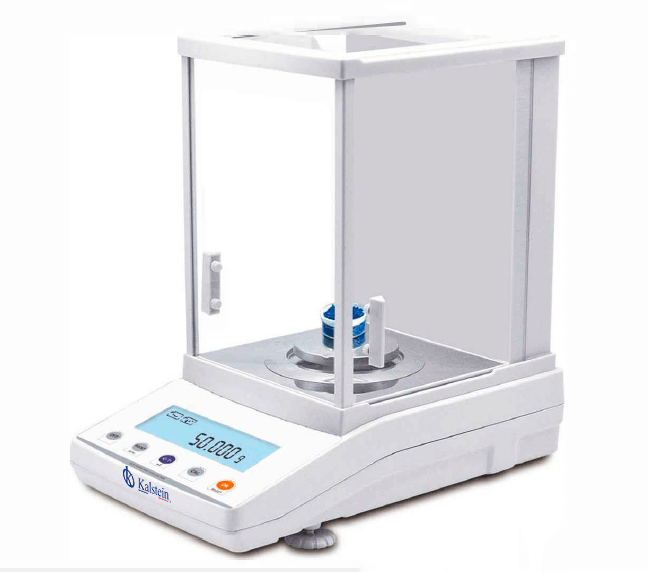
Installation and Startup Guide for the YR05774 Analytical Balance
The YR05774 Analytical Balance is engineered for precision and reliability, making it essential in laboratory environments. Ensuring proper installation and startup is crucial for achieving accurate measurements. This guide will walk you through the essential steps for installing and initializing the YR05774.
Unboxing and Initial Setup
Upon receiving the YR05774, carefully unbox the unit and check all components against the included checklist. Ensure that the following items are present:
- YR05774 Analytical Balance
- Power Cable
- User Manual
- Calibration Weight (500g)
- Windshield
Once confirmed, proceed to select a suitable location for the balance. Key considerations include a stable, level surface away from vibrations and drafts.
Physical Setup: Leveling the YR05774
To ensure accurate readings, leveling is an essential step. Use the built-in leveling feet and bubble level indicator located on the front of the balance. Adjust the feet until the bubble is centered. This adjustment compensates for any minor surface imperfections.
Powering Up the YR05774
Connect the power cable to the YR05774 and plug it into a suitable power outlet. Turn on the device using the power button, and allow it to warm up for a few minutes. The balance will automatically run a self-check to confirm operational integrity.
Calibration Process
Calibrating the YR05774 is critical for precision. The balance features internal calibration capabilities. To initiate calibration:
- Press the CAL button.
- Select the internal calibration option.
- When prompted, place the 500g calibration weight on the weighing pan.
- Wait for the balance to complete the calibration cycle.
After calibration is successful, the balance will display a confirmation message.
Connecting the YR05774 to External Devices
The YR05774 offers connectivity options via RS232 for standard communication and USB for additional compatibility. To establish a connection:
- Identify the communication port on the rear panel of the balance.
- Use the appropriate cable to connect the balance to a computer or printer.
- Ensure proper drivers are installed on the connected device.
This connectivity allows for data transfer and printing of results, enhancing laboratory workflow.
First Measurement and Validation
Once the YR05774 is calibrated and connected, the first measurement can be taken. Place a sample on the weighing pan and observe the display. The reading should stabilize within three seconds. Validate this measurement by repeating it with the calibration weight to ensure consistency.
Common Installation Mistakes
During the installation and startup of the YR05774, operators may encounter several common mistakes. Awareness of these can help ensure proper functioning:
- Improper leveling leading to inaccurate measurements.
- Failure to calibrate before use.
- Placement of the balance near sources of vibration or drafts.
- Incorrect connectivity setup, preventing data transfer.
Technical Specifications of the YR05774
| Specification | Detail |
|---|---|
| Model | YR05774 |
| Capacity | 1200g |
| Readability | 0.001g |
| Minimum Weight | 0.004g |
| Repeatability | ±0.002g |
| Linearity | ±0.003g |
| Stabilization Time | ≤3S |
| Pan Size | Ø100mm |
| Overall Dimensions | 340x215x350mm |
| Weight | 11kg |
| Calibration | Internal/External |
Frequently Asked Questions
What should I do if the YR05774 does not power on?
If the YR05774 does not power on, check the power cable connection to ensure it is securely plugged into the outlet. Additionally, verify that the outlet is functioning by testing it with another device. If the balance still does not power on, consider contacting technical support for further assistance.
How can I fix error codes displayed on the YR05774?
Error codes can indicate various issues ranging from calibration errors to overload conditions. Refer to the user manual for specific error codes and recommended troubleshooting steps. Most issues can be resolved by recalibrating the balance or adjusting the load on the weighing pan.
What is the recommended environment for operating the YR05774?
The ideal operating environment for the YR05774 is between 15-35°C with low humidity and minimal vibrations. Ensure that the balance is placed away from drafts, direct sunlight, and other equipment that may cause interference.
How often should I calibrate the YR05774?
The YR05774 should be calibrated regularly, ideally before each use or at least once a day, depending on the frequency of use and environmental conditions. If the balance is moved, recalibration is also necessary.
What are the optional accessories available for the YR05774?
Optional accessories for the YR05774 include additional calibration weights, a printer for hardcopy results, and various pans for specialized weighing applications. These accessories can enhance the functionality and versatility of the balance in laboratory settings.
Can I connect the YR05774 to my computer?
Yes, the YR05774 can be connected to a computer via RS232 or USB. This connection allows for data transfer, making it easier to collect and analyze measurement results. Ensure proper drivers are installed for seamless communication.
Where can I find replacement parts for the YR05774?
Replacement parts for the YR05774 can be obtained through authorized dealers or directly from the manufacturer. It is important to use OEM parts to maintain the balance's integrity and performance.
If you are looking for a fusion of innovation and quality, you have come to the right place. At Kalstein, we offer you the luxury of exploring our exclusive catalog of laboratory equipment. We manufacture every device to the highest standards of excellence. Our intuitive and seamless online purchasing channels are designed for your convenience, securing the most competitive prices. Hesitate no longer — we bring science to life, it is time to become part of our community.