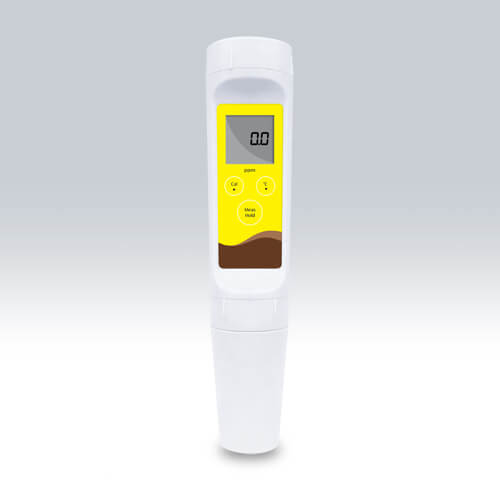
Installation and Startup Guide for the YR01812 Pocket TDS Meter
The YR01812 Pocket TDS Meter is an essential tool for measuring Total Dissolved Solids (TDS) in various applications, from aquariums to clean water testing. This guide aims to provide detailed steps for the installation and startup of the YR01812, ensuring users can effectively utilize this device from the moment it arrives.
Unboxing and Initial Inspection
Upon receiving your YR01812, it is imperative to perform an initial inspection to ensure all components are included and undamaged. Here is what to look for:
- YR01812 Pocket TDS Meter
- Instruction Manual
- Calibration Solution (744 ppm)
- 3 LR44 Batteries
- Protective Cap
If any components are missing or damaged, contact your supplier immediately for a resolution.
Installation Requirements
To install and set up the YR01812, ensure that the environment meets the following criteria:
- Temperature Range: 0 to 50°C
- Humidity: Avoid high humidity areas that could affect electronic components
- Power Supply: Ensure batteries are installed before powering up
This preparation will help maintain the longevity and accuracy of the YR01812 Pocket TDS Meter.
Powering Up the YR01812
Before using the YR01812, it is crucial to install the batteries and power the device:
- Open the battery compartment located at the back of the meter.
- Insert three LR44 batteries with the correct polarity.
- Close the battery compartment securely.
- Press the power button to turn on the device.
If the device does not power on, check the battery installation and replace the batteries if necessary.
Calibrating the YR01812
Calibration is a critical step for ensuring accurate measurements. The YR01812 features a one-point calibration process using the provided calibration solution:
- Turn on the device by pressing the power button.
- Remove the protective cap from the probe.
- Submerge the probe into the calibration solution (744 ppm).
- Press the calibrate button until the display reads 'Cal'.
- Wait for the reading to stabilize and confirm calibration.
- Rinse the probe with distilled water and dry it before use.
Calibration should be performed regularly to maintain measurement accuracy.
Performing Your First Measurement
Once calibrated, the YR01812 is ready for use. Follow these steps for accurate TDS measurements:
- Rinse the probe with distilled water to avoid contamination.
- Submerge the probe into the sample solution you wish to measure.
- Allow the reading to stabilize, indicated by a steady display.
- Press the hold button to freeze the reading for recording.
Ensure the probe is cleaned after each measurement to prevent cross-contamination between samples.
Common Setup Mistakes and Troubleshooting
Here are some common mistakes during the installation and setup of the YR01812, along with troubleshooting tips:
| Mistake | Symptoms | Solutions |
|---|---|---|
| Incorrect battery installation | Device does not power on | Check battery orientation and replace batteries if needed |
| Improper calibration | Inaccurate readings | Recalibrate using the correct solution |
| Contaminated probe | Erratic readings | Clean the probe thoroughly with distilled water |
Technical Specifications of the YR01812
| Model | YR01812 (current) |
|---|---|
| TDS Range | 5 to 1000 ppm |
| Resolution | 1 ppm |
| Accuracy | ±1% F.S. |
| Calibration Point | 1 point |
| Calibration Solution | 744 ppm |
| Temperature Range | 0 to 50°C |
| Display Type | 1-line LCD (21 × 21 mm) |
| Power Source | 3 LR44 alkaline batteries |
| Battery Life | Approximately 150 hours continuous use |
| Weight | 100 g |
| Dimensions | 185(L) x 40(Dia.) mm |
Frequently Asked Questions
What should I do if the YR01812 gives inconsistent readings?
If you encounter inconsistent readings with your YR01812, check the calibration status, ensure the probe is properly rinsed and cleaned, and verify that you are measuring within the specified range of the device. Regular calibration is essential for maintaining accuracy.
How often should I calibrate my YR01812 Pocket TDS Meter?
Calibration frequency depends on usage; however, it is recommended to calibrate the YR01812 at least once a month or before significant measurements. For critical applications, consider daily calibration.
Can I use the YR01812 in extreme temperatures?
The YR01812 is designed to operate within a temperature range of 0 to 50°C. Using the device outside this range may lead to inaccurate readings and potential damage.
What is the purpose of the hold function on the YR01812?
The hold function on the YR01812 allows users to freeze the current reading on the display for easy viewing and recording. This is particularly useful when taking measurements in hard-to-access areas.
Is the YR01812 waterproof?
Yes, the YR01812 features a waterproof design, making it suitable for use in various environments, including those where splashes or moisture may occur. However, ensure not to fully submerge the device in water.
What type of maintenance does the YR01812 require?
The YR01812 requires minimal maintenance. Regularly clean the probe, recalibrate as needed, and replace the batteries when the device shows low battery warnings. Ensure to store it in a dry place.
How do I request a quote for the YR01812?
You can easily request a quote for the YR01812 Pocket TDS Meter through our dedicated channels. Please reach out to our support team who will assist you with pricing and availability.
If you are looking for a fusion of innovation and quality, you have come to the right place. At Kalstein, we offer you the luxury of exploring our exclusive catalog of laboratory equipment. We manufacture every device to the highest standards of excellence. Our intuitive and seamless online purchasing channels are designed for your convenience, securing the most competitive prices. Hesitate no longer — we bring science to life, it is time to become part of our community.