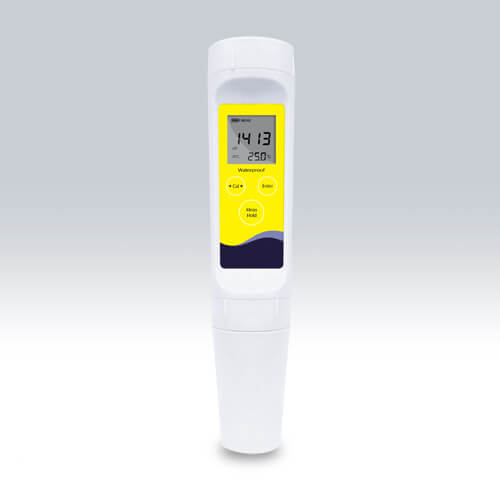
Installation and Startup Guide for the YR01809 Conductivity Meter
The YR01809 Conductivity Meter is a versatile multi-parameter device designed for accurate measurement of Total Dissolved Solids (TDS), conductivity, and temperature. This guide provides a thorough overview of the installation and initial setup process to ensure optimal performance and accuracy.
Unboxing and Initial Inspection
Upon receiving your YR01809 Conductivity Meter, perform an initial inspection and unboxing to ensure all components are intact. Save the packaging for potential future shipping or storage needs. The following items should be present in the box:
- YR01809 Conductivity Meter
- Protective cap for the electrode
- User manual
- Calibration solutions (84 µS, 1413 µS, 12.88 mS)
- Batteries (2 AAA 1.5V)
Check for any visible damage and refer to the user manual for any missing components.
Site Requirements for Optimal Operation
Before setting up the YR01809, ensure that the installation environment meets the necessary conditions:
- Temperature: 0 to 60°C (32 to 140°F)
- Humidity: 0 to 80% non-condensing
- Power supply: 2 AAA batteries
- Clearance: Ensure adequate space around the device for ventilation
Consider using an anti-static mat to prevent any potential damage from static electricity during setup.
Power Up Sequence
To power on the YR01809, insert the provided AAA batteries in the correctly marked slots. The device will automatically turn on when the first button is pressed. If the device does not power on, check the battery orientation and replace the batteries if necessary.
Calibration Process
Calibrating the YR01809 is crucial for accurate measurements. Follow these steps:
Step 1: Access Calibration Mode
Press the 'MODE' button to enter the calibration mode. The display will show the current measurement type.
Step 2: Select Calibration Point
Choose a calibration point (1 to 3 points) based on the solutions you will be using. For instance, start with the 1413 µS solution for a standard conductivity calibration.
Step 3: Immerse the Electrode
Rinse the electrode with distilled water and immerse it in the calibration solution. Wait for the reading to stabilize, indicated by a steady display.
Step 4: Confirm Calibration
Once the reading stabilizes, press the 'CAL' button to confirm the calibration. Follow the same steps for additional calibration points if necessary.
First Measurement Validation
After calibration, it is essential to validate the first measurement. Follow these steps:
- Rinse the electrode with distilled water again and immerse it in the sample solution.
- Wait for the reading to stabilize before recording the result. A stable reading indicates a successful calibration and measurement process.
Common Setup Mistakes to Avoid
Here are some common mistakes that could affect the setup and operation of the YR01809:
- Improper calibration: Always ensure the electrode is rinsed and dried properly between measurements.
- Using the wrong calibration solution: Make sure to select the appropriate solution for the calibration point.
- Ignoring temperature compensation: The YR01809 has an automatic temperature compensation feature; ensure it is functioning correctly to prevent inaccurate readings.
- Operating under unsuitable environmental conditions: Always maintain the recommended temperature and humidity levels.
Technical Specifications of YR01809
| Model | YR01809 |
|---|---|
| Conductivity Range | 0 to 20.00, 200.0, 2000 µS/cm, 20.00 mS/cm |
| Resolution | 0.01, 0.1, 1 |
| Accuracy | ±1% full scale |
| Calibration Points | 1 to 3 points |
| Calibration Solutions | 84 µS, 1413 µS, 12.88 mS |
| TDS Range | 0 to 10.00, 100.0, 1000 ppm |
| Temperature Range | 0 to 60°C / 32 to 140°F |
| Power Supply | 2 AAA batteries |
| Weight | 100 grams |
| Dimensions | 185 (L) × 40 (Diameter) mm |
Frequently Asked Questions
What types of calibration solutions are compatible with YR01809?
The YR01809 is compatible with calibration solutions such as 84 µS, 1413 µS, and 12.88 mS, which are essential for performing accurate calibrations based on different conductivity ranges.
How often should the YR01809 be calibrated?
It is recommended to calibrate the YR01809 before each use or at least once a week for consistent measurement accuracy, especially if used in varying environmental conditions.
What should I do if the readings appear inaccurate?
If the readings are inconsistent, verify that the electrode is clean and properly calibrated. Check for any accumulated residues or wear that may affect performance.
Can the YR01809 be used in outdoor environments?
While the YR01809 is designed to withstand harsh conditions, it is essential to ensure that it operates within the specified temperature and humidity ranges for optimal results.
What maintenance is required for the YR01809?
Regularly clean the electrode with distilled water, calibrate the device as needed, and replace the batteries when the low battery indicator appears. Store the device in a dry area to prevent corrosion.
Is the YR01809 waterproof?
The YR01809 features a waterproof design, making it suitable for use in various environments. However, ensure that all seals are intact to maintain its waterproof capabilities.
Where can I request a quote for the YR01809?
You can request a quote for the YR01809 through our dedicated sales channels, or you may inquire through our customer service for detailed pricing and availability.
If you are looking for a fusion of innovation and quality, you have come to the right place. At Kalstein, we offer you the luxury of exploring our exclusive catalog of laboratory equipment. We manufacture every device to the highest standards of excellence. Our intuitive and seamless online purchasing channels are designed for your convenience, securing the most competitive prices. Hesitate no longer — we bring science to life, it is time to become part of our community.