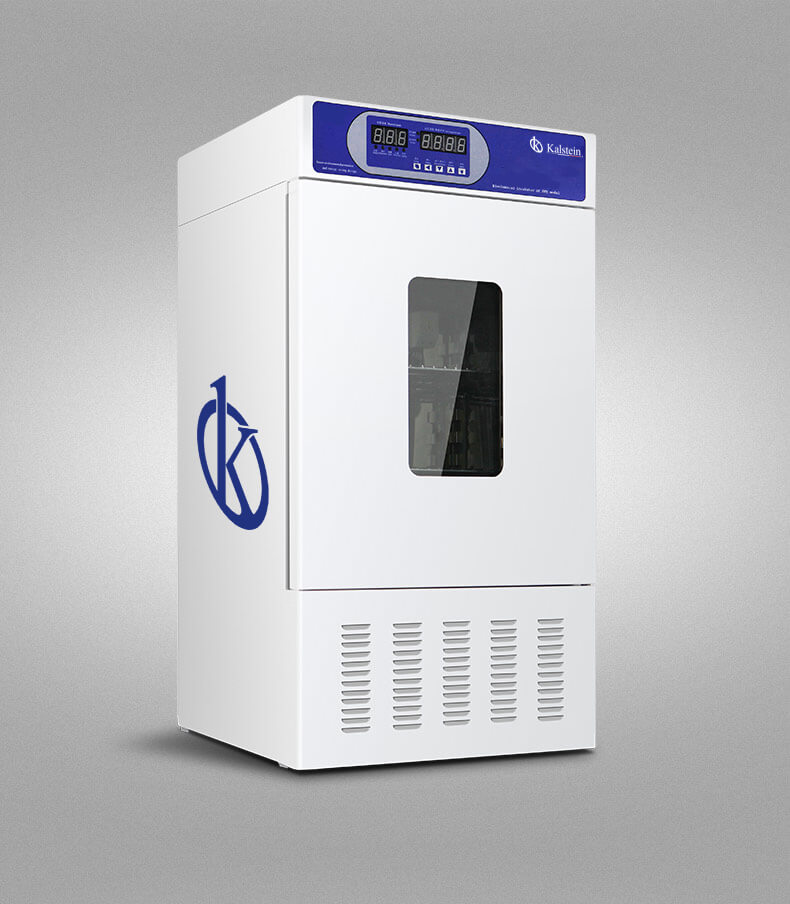
Comprehensive Installation Guide for the YR02041 Bacterial Incubator
The YR02041 Bacterial Incubator is engineered for precise temperature control in various scientific fields, including environmental protection, medical testing, and aquaculture. This guide will provide you with detailed steps for the installation and commissioning process to ensure optimal performance and reliability.
Understanding the Role of the YR02041 Bacterial Incubator
The YR02041 model serves as a crucial tool for maintaining stable environments necessary for the growth of bacteria and microbial cultures. Its design emphasizes energy efficiency, reduced noise, and an integrated cooling system. The incubator is specifically built for a range of applications, including biochemical analysis, microbiological culture protection, and clinical studies.
Technical Specifications of the YR02041
| Model | Temperature Range (°C) | Accuracy (°C) | Fluctuation (%) | Voltage (V) | Power (KW) | Interior Size (mm) (H*W*D) | Total Dimensions (mm) (H*W*D) | Packaging Size (mm) (H*W*D) | Net Weight (KG) | Shipping Weight (KG) |
|---|---|---|---|---|---|---|---|---|---|---|
| YR02041 | 0~60 | ±0.5 | ±1 | 220 | 0.35 | 580×450×380 / 100L | 1100×590×620 | 1220×670×700 | 90 | 98 |
Unboxing and Initial Setup
When unboxing the YR02041, ensure that the unit has arrived without any visible damage. Check all components against the included inventory list. The essential items to look for include:
- YR02041 Bacterial Incubator
- Power Cable
- Instruction Manual
- Calibration Certificates (if applicable)
Once unboxed, place the incubator on a stable, level surface in an area that meets its environmental requirements, including ventilation and power access. Avoid placing it in direct sunlight or near heat sources to ensure consistent performance.
Power-Up Sequence and Calibration
To power up the YR02041, follow these steps:
- Connect the power cable to the incubator and plug it into an appropriate electrical outlet.
- Turn on the incubator using the power switch located on the front panel.
- Adjust the temperature settings using the LED controller. Set it to the desired temperature based on your application.
- Allow the incubator to reach the set temperature, which may take some time depending on the initial conditions.
- Once the incubator stabilizes, perform calibration checks to ensure accuracy by using certified thermometers or temperature verification devices.
Regular calibration checks are essential for maintaining the integrity of your experiments.
Common Installation Mistakes to Avoid
Here are common mistakes to avoid during installation:
- Not leveling the unit, which can affect temperature uniformity.
- Placing the unit in an area with insufficient ventilation.
- Using improper power sources, such as extension cords.
- Failing to conduct a first-run calibration before use.
Site Preparation Checklist
| Checklist Item | Description |
|---|---|
| Space Requirements | Ensure adequate space around the incubator for airflow and maintenance access. |
| Electrical Specifications | Verify voltage and power specifications are met. |
| Temperature Control | Ensure the installation site maintains a stable temperature. |
| Humidity Control | Check that humidity levels in the room are suitable for the intended application. |
| Accessibility | Confirm that the incubator is easily accessible for operation and maintenance. |
Frequently Asked Questions
What are the key features of the YR02041 Bacterial Incubator?
The YR02041 Bacterial Incubator features an imported compressor cooling system, a smooth start-up mechanism, a delay protection function, and LED temperature control. These elements combined ensure a reliable environment for bacterial cultivation.
How do I calibrate the YR02041 for accurate temperature readings?
Calibration involves using a precise external thermometer placed inside the incubator. Adjust the incubator settings until the displayed temperature matches the thermometer reading after stabilization.
What is the best way to maintain the YR02041 Bacterial Incubator?
Regular maintenance includes cleaning the interior surfaces, checking seals for integrity, calibrating the unit at regular intervals, and ensuring the exterior is free from dust and debris to maintain optimal air circulation.
Can the YR02041 be used for purposes other than bacterial culture?
Yes, the YR02041 can be utilized in chemical analysis, environmental studies, and various biomedical applications where controlled temperature environments are required.
What are the electrical requirements for the YR02041?
The YR02041 requires a power supply of 220V with a power consumption of 0.35KW. Ensure that the outlet matches these specifications to avoid damage to the unit.
What should I do if the incubator displays an error code?
Refer to the user manual for a list of error codes and troubleshooting steps. Common solutions include resetting the unit, checking electrical connections, and verifying temperature settings.
How can I request a quote for the YR02041?
You can easily request a quote for the YR02041 Bacterial Incubator through our designated channels for pricing inquiries.
If you are looking for a fusion of innovation and quality, you have come to the right place. At Kalstein, we offer you the luxury of exploring our exclusive catalog of laboratory equipment. We manufacture every device to the highest standards of excellence. Our intuitive and seamless online purchasing channels are designed for your convenience, securing the most competitive prices. Hesitate no longer — we bring science to life, it is time to become part of our community.