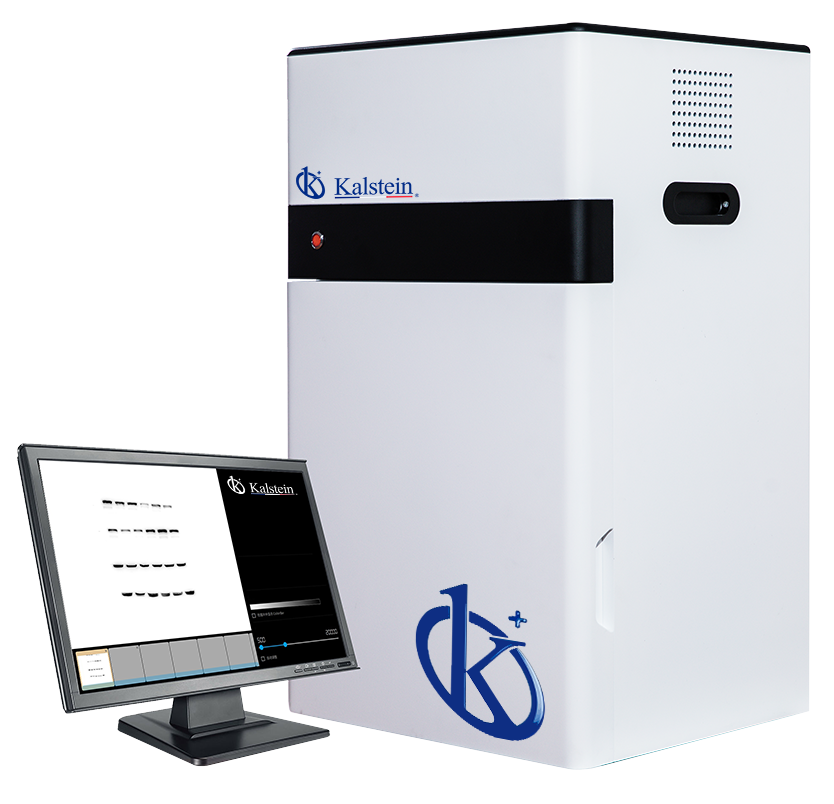
Common Errors and Troubleshooting for the YR06068 Multifunctional Imaging System
The YR06068 Multifunctional Imaging System is a versatile and powerful tool utilized in various laboratory settings for imaging and documentation purposes. However, like any sophisticated instrument, users may encounter issues that need resolving. This article will focus on the common errors associated with the YR06068 and provide practical troubleshooting steps to ensure uninterrupted operation.
Understanding the YR06068 Multifunctional Imaging System
The YR06068 is equipped with advanced features such as a cooled CCD camera, excellent resolution, and comprehensive software capabilities. Its wide viewing area of up to 20x20 cm makes it suitable for various applications, including Western blotting. Understanding the basics of its operation will assist in diagnosing issues more effectively.
Technical Specifications of the YR06068
| Specification | Details |
|---|---|
| Model | YR06068 (current) |
| Camera Type | Cooled CCD Camera |
| Physical Resolution | 6 Megapixels, 2750*2200 |
| Pixel Density and A/D | 16 bits |
| Gray Scales | 65536 |
| Dynamic Range | ≥4.6OD |
| Cooling Temperature | -60℃ ambient, -30℃ regulated |
| Lens Type | Ultrasensitive Objective F0.8 |
| Sample Tray for Chemiluminescence | 4 Layers |
| UV Transmission | 302nm-312nm, area: 21x26cm |
| White LED Transmission | Surface: 19x26cm |
| Filter Wheel | Position Five |
| UV Protection | UV Shield |
| Image Acquisition Software | No dongle needed, unlimited users, free updates |
| Image Analysis Software | No dongle needed, unlimited users, free updates |
Troubleshooting by Symptom
When working with the YR06068, users may experience various issues that may hinder its performance. Below are common symptoms, probable causes, and solutions.
Equipment Does Not Power On
The inability of the YR06068 to power on can be concerning. Possible causes include faulty power connections or issues with the power supply.
- Solution: Check the power outlet, ensure the power cable is securely connected, and inspect for any visible damage to the cable.
Error Code E-03
Error Code E-03 may indicate a problem with the image acquisition process. This can occur due to software-related issues or hardware malfunctions.
- Solution: Restart the software and check for updates. If the problem persists, consult the user manual for further guidance.
Inconsistent Readings
Users may encounter inconsistent readings during experiments. This can be attributed to several factors, including improper calibration or environmental conditions.
- Solution: Ensure the device is calibrated according to the manufacturer's instructions. Additionally, verify that environmental conditions such as temperature and humidity are stable.
Common Symptoms and Solutions Table
| Symptom | Possible Cause | Solution |
|---|---|---|
| Equipment does not power on | Faulty power connection | Check power outlet and connections |
| Error Code E-03 | Software/hardware malfunction | Restart software and check updates |
| Inconsistent readings | Calibration issues | Re-calibrate device |
Preventive Maintenance Tips
Maintaining the YR06068 can prevent many common errors. Here are some tips to consider:
- Regularly check and update software to ensure optimal performance.
- Keep the area around the equipment clean and free of dust.
- Inspect cables and connections for damage periodically.
- Follow the manufacturer's guidelines for cleaning the optical components.
Frequently Asked Questions
What should I do if the YR06068 displays an error message?
If the YR06068 displays an error message, consult the user manual for guidance on troubleshooting specific error codes. Ensure the device is properly set up and that all connections are secure.
How can I ensure consistent results with the YR06068?
To achieve consistent results with the YR06068, regularly calibrate the device and maintain stable environmental conditions during experiments. Follow all operational protocols provided in the user manual.
What maintenance is required for the YR06068?
Routine maintenance for the YR06068 includes checking software for updates, cleaning optical components, and inspecting power cables and connections. Following the manufacturer's maintenance schedule will ensure longevity and reliability.
Can I use third-party software with the YR06068?
While the YR06068 is designed to work optimally with its proprietary software, some users may choose to try third-party solutions. It is recommended to consult the manufacturer before doing so, as compatibility may vary.
Is there a warranty for the YR06068?
The YR06068 typically comes with a warranty that covers manufacturing defects. Details on warranty terms can be found in the user manual.
What are the typical applications of the YR06068?
The YR06068 is commonly used in various applications, including Western blotting, chemiluminescence imaging, and documentation of electrophoresis gels. The device's versatility makes it suitable for both clinical and research settings.
If you are looking for a fusion of innovation and quality, you have come to the right place. At Kalstein, we offer you the luxury of exploring our exclusive catalog of laboratory equipment. We manufacture every device to the highest standards of excellence. Our intuitive and seamless online purchasing channels are designed for your convenience, securing the most competitive prices. Hesitate no longer — we bring science to life, it is time to become part of our community.