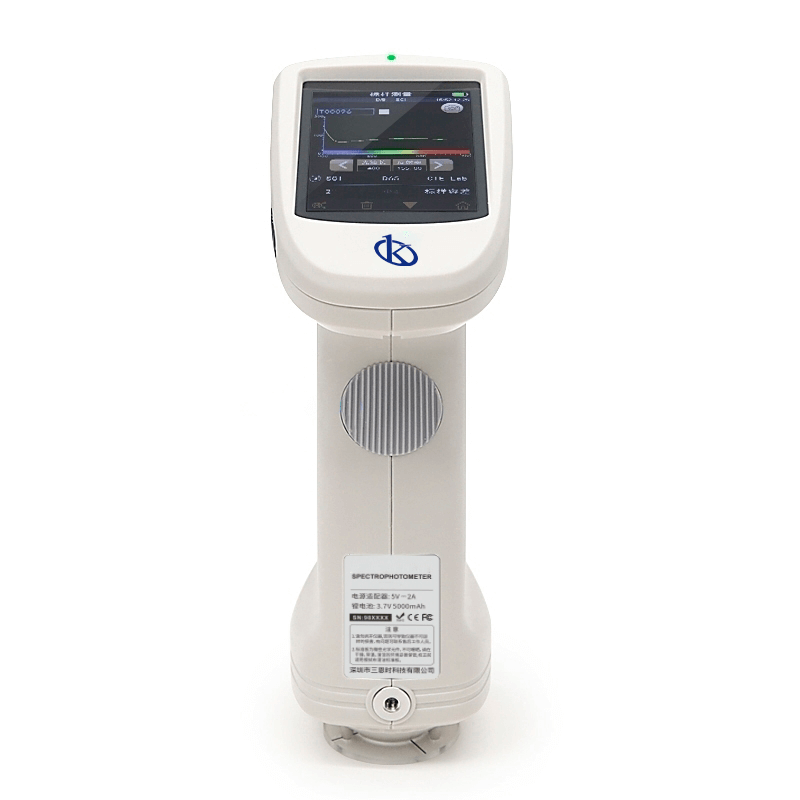
Common Errors and Troubleshooting for the YR05493 Spectrophotometer
The YR05493 Spectrophotometer is a sophisticated instrument designed for precise color measurement across various industries. Despite its advanced technology, users may encounter operational errors that can hinder performance. This comprehensive guide focuses on common error symptoms associated with the YR05493 and provides practical troubleshooting solutions to ensure optimal functionality.
Understanding the YR05493 Spectrophotometer
The YR05493 Spectrophotometer utilizes a dual optical path system, high-quality LED light source, and a silicon photodiode sensor matrix to measure color reflectance accurately. Its design incorporates a D/8 geometry, compliant with international standards, making it suitable for laboratory settings and industrial applications.
Technical Specifications of the YR05493
| Model | YR05493 |
|---|---|
| Optical Geometry | D/8 (Diffuse illumination, 8-degree viewing angle) |
| Measurement Modes | SCI (specular component included) / SCE (specular component excluded) |
| Light Source | Full-spectrum LED with UV |
| Measurement Range | 400-700nm |
| Weight | Approximately 600g |
| Battery Life | 6000 measurements in 8 hours |
Troubleshooting Common Symptoms
Equipment Does Not Power On
If the YR05493 Spectrophotometer does not power on, consider the following possible causes:
- Defective power cable or adapter.
- Insufficient battery charge.
- Internal circuit failure.
Solution:
- Check the power cable for any visible damage and replace if necessary.
- Ensure the battery is charged; use the charging function as needed.
- If the device still fails to power on, contact technical support for further diagnostics.
Error Code E-03
Error code E-03 typically indicates a sensor malfunction. This error can arise from:
- Dirty sensor lens.
- Improper calibration.
Solution:
- Clean the sensor lens gently using a soft, lint-free cloth.
- Perform a recalibration following the user manual's instructions.
Inconsistent Readings
If you observe fluctuating measurement results, consider these factors:
- Environmental changes (temperature, humidity).
- Improper sample positioning.
Solution:
- Ensure the instrument is used in a controlled environment, avoiding direct sunlight or drafts.
- Check sample alignment and positioning within the measurement area.
Symptom-Cause-Solution Table
| Symptom | Potential Cause | Solution |
|---|---|---|
| Equipment does not power on | Defective power cable | Replace power cable |
| Error code E-03 | Dirty sensor lens | Clean sensor lens |
| Inconsistent readings | Improper sample positioning | Reposition sample |
Best Practices for YR05493 Maintenance
To prevent errors from occurring in the YR05493, regular maintenance is crucial. This includes:
- Routine calibration every six months to ensure accuracy.
- Frequent cleaning of optical components to reduce interference.
- Storing the device in a stable environment away from extreme temperatures and humidity.
Frequently Asked Questions
What should I do if the YR05493 displays an error code?
Consult the user manual to identify the error code. Most codes will have an associated solution. If issues persist, contact customer support.
How often should I calibrate my YR05493?
It is recommended to calibrate the YR05493 every six months or after significant changes in operating conditions.
Can I use third-party accessories with the YR05493?
While some third-party accessories may be compatible, it is advisable to use approved accessories to ensure optimal performance.
What is the warranty period for the YR05493?
The YR05493 typically comes with a one-year warranty covering manufacturing defects. Always check your warranty terms upon purchase.
How can I ensure accurate measurements with the YR05493?
To ensure accurate measurements, keep the sensor clean, calibrate regularly, and ensure samples are properly positioned during measurement.
Is there a recommended procedure for cleaning the YR05493?
Use a soft, lint-free cloth for cleaning the optical components and avoid harsh chemicals that can damage the device.
Conclusion
Understanding the common errors and troubleshooting techniques for the YR05493 Spectrophotometer is essential for maintaining its performance and accuracy. By following this guide, users can address symptoms effectively and ensure that their measurements are reliable. For any additional assistance or to request a quote on the YR05493, reach out to your Kalstein representative.
If you are looking for a fusion of innovation and quality, you have come to the right place. At Kalstein, we offer you the luxury of exploring our exclusive catalog of laboratory equipment. We manufacture every device to the highest standards of excellence. Our intuitive and seamless online purchasing channels are designed for your convenience, securing the most competitive prices. Hesitate no longer — we bring science to life, it is time to become part of our community.