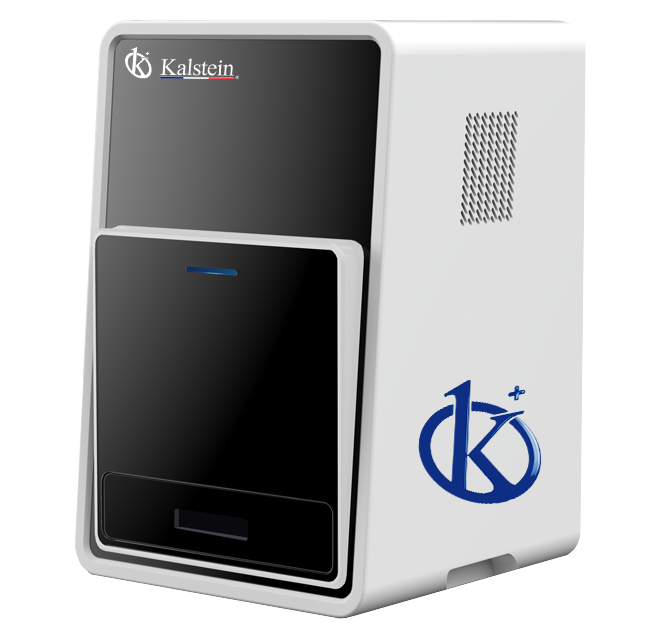
Common Errors and Troubleshooting Symptoms for the YR06065 Chemiluminescence Imager
The YR06065 Chemiluminescence Imager is a compact yet powerful device designed for various laboratory applications, especially in Western blotting using enhanced chemiluminescence (ECL) techniques. While it is built for efficiency and ease of use, users may occasionally encounter errors or unusual symptoms during operation. Understanding these symptoms and their associated troubleshooting steps is crucial for maintaining the efficiency of the device.
Technical Specifications of YR06065
| Model | YR06065 | YR06066 |
|---|---|---|
| Digital Camera | Cooling CCD Camera | |
| Physical Resolution | 6 Megapixels, 2750*2200 | |
| Pixel Density and A/D | 16 bits | |
| Gray Scales | 65536 | |
| Dynamic Range | ≥4.6OD | |
| Cooling Temperature | -60℃ ambient, -30℃ regulated | |
| Scientific Lens (Difference between models) | Sensitive Lens F0.95 | Ultra-sensitive Lens F0.8 |
| Image Acquisition Software | No dongle needed, unlimited users, free updates | |
| Image Analysis Software | No dongle needed, unlimited users, free updates |
Common Symptoms and Troubleshooting Steps
When operating the YR06065 Chemiluminescence Imager, users may face various symptoms that could indicate underlying issues. Below is a comprehensive guide to common symptoms, probable causes, and solutions.
Equipment Does Not Power On
If the YR06065 does not power on, check the following:
- Ensure that the device is securely plugged into a power source.
- Check the power switch to ensure it is in the 'on' position.
- Inspect the power cable for any visible damage or wear.
- Verify if the power outlet is functioning by testing it with another device.
If these steps do not resolve the issue, consider seeking professional service assistance.
Error Code E-03
Error code E-03 may indicate a problem with the imaging software or hardware malfunction. To troubleshoot:
- Restart the device to reset the software.
- Update the imaging software to the latest version.
- Ensure that the camera is correctly connected and functioning.
- If the error persists, consult the user manual for further guidance.
Inconsistent Readings
Inconsistent readings can arise from several factors:
- Check the calibration of the device; recalibrate if necessary.
- Inspect for proper sample handling and preparation techniques.
- Ensure that the reagents used are fresh and compatible.
- Evaluate environmental conditions such as temperature and humidity.
Symptom-Cause-Solution Table
| Symptom | Probable Cause | Solution |
|---|---|---|
| Equipment Does Not Power On | Power source issues | Check power cable, switch, and outlet. |
| Error Code E-03 | Software or hardware malfunction | Restart, update, and check connections. |
| Inconsistent Readings | Calibration or sample preparation issues | Recalibrate and inspect samples and reagents. |
Frequently Asked Questions
What should I do if my YR06065 Chemiluminescence Imager shows an error message?
If your YR06065 displays an error message, consult the troubleshooting section of the user manual. Common errors can often be resolved by restarting the device or recalibrating. If the issue persists, consider contacting technical support.
How do I maintain my YR06065 for optimal performance?
To maintain optimal performance of your YR06065, regularly clean the external surfaces, ensure proper calibration, and keep the software updated. Also, store the device in a controlled environment to prevent damage from humidity or temperature fluctuations.
Are there any specific accessories recommended for the YR06065?
Compatible accessories for the YR06065 include high-quality imaging reagents, calibration standards, and software updates. Ensure to use only compatible consumables to maintain accuracy and device integrity.
Can I troubleshoot common issues without professional help?
Yes, many common issues can be diagnosed and resolved by following the troubleshooting guide in the user manual. However, for persistent problems or complex errors, it is advisable to seek professional assistance.
How often should I replace the imaging software for my YR06065?
It is recommended to check for updates regularly and to install updates whenever they become available to ensure optimal performance and security of your YR06065's imaging capabilities.
What are the common mistakes made during the setup of the YR06065?
Common mistakes include improper connection of cables, failing to calibrate the device before use, and not following the environmental requirements for operation. Always refer to the setup guidelines in the manual to avoid these errors.
Where can I find replacement parts for the YR06065?
Replacement parts for the YR06065 can typically be sourced from the manufacturer or authorized distributors. Always ensure that you are obtaining genuine parts to maintain device integrity.
If you are looking for a fusion of innovation and quality, you have come to the right place. At Kalstein, we offer you the luxury of exploring our exclusive catalog of laboratory equipment. We manufacture every device to the highest standards of excellence. Our intuitive and seamless online purchasing channels are designed for your convenience, securing the most competitive prices. Hesitate no longer — we bring science to life, it is time to become part of our community.